

Construction scheduling software
An easy-to-use construction scheduling software for planning, managing and tracking construction project schedules in real time.
Construction project scheduling with Admicom Tempo
Admicom Tempo is a browser-based construction scheduling software for planning and managing construction projects and worksites. It ensures that work progresses according to plan, optimises time usage and enables real-time schedule updates for all project stakeholders.
Tempo is easy to adopt even for smaller construction companies. It’s a user-friendly solution for managing construction site schedules and sharing information, with a clear, multilingual interface.
You can also enhance Tempo with Admicom Planner, which offers versatile and comprehensive tools for scheduling even the most demanding projects.








Why choose our construction scheduling software
-
Efficient construction scheduling
Tempo helps ensure that on-site work progresses according to plan, supporting efficient use of time across construction projects. Clear and well-managed schedules reduce delays, minimise waste and help keep projects on budget.
-
Access your schedules anywhere
This cloud-based solution allows you to access construction schedules wherever you work. Tempo runs smoothly on both desktop and mobile devices, making it easy to stay up to date on site and in the office.
-
Real-time schedule updates for all stakeholders
Real-time updates keep all project stakeholders aligned as schedules change. With everyone working from the same up-to-date information, communication is smoother and decisions can be made faster.
-
Ideal for smaller construction companies
Tempo is designed with smaller construction teams in mind, offering an easy-to-adopt scheduling tool without unnecessary complexity. Flexible software versions let you choose a setup that fits your needs.
"With Tempo, we’ve scheduled our largest construction sites where we act as the main contractor. It has made things easier for subcontractors, as they can see when each task is scheduled and prepare accordingly. Likewise, we’re able to keep residents in housing cooperatives better informed about the progress of the schedule."
Miska Rissanen
Choose the right version for your needs
Tempo offers solutions tailored to companies of all sizes, ensuring efficient time utilisation and minimising waste throughout every project lifecycle.
Choose the software version that best fits your needs. You can upgrade or change your version as your requirements evolve.
* Upcoming features
Standard
30 €/user/month
- Gantt chart
- Project monitoring
- Integrations
- Sharing information
- Weekly schedule
Pro
51 €/user/month
- Gantt chart
- Project monitoring
- Integrations
- Sharing information
- Resourcing
- Multi-project management
- Weekly schedule
- ToDo-list *
- AI support *
Key features of Admicom Tempo
Admicom Tempo helps you plan, manage and track construction project schedules with ease. Explore the key features that support efficient construction scheduling.
Segment diagram (Gantt Chart)
The Gantt chart, also known as a bar chart, is a fundamental scheduling tool used by everyone involved in project planning. It is one of the core features of Admicom Tempo, and often the starting point for creating a schedule. It provides a solid foundation for master schedules, design schedules, and phase-specific schedules.
The data in the Gantt chart can be easily refined with quantities, resources, costs, and revenues to gain more detailed insights.
Track construction site schedules in real time
With Tempo, you can monitor the project’s current status and compare it to the original plan. In the weekly schedule, updating task progress allows you to track actual execution against the plan. This helps in project management and swiftly identifies potential issues.
Tempo's tracking tools are evolving rapidly. Integrations with our group's other software enable more in-depth analysis and reporting, simplifying the identification of inefficiencies on construction sites and enhancing the results of current and future projects.
Schedule printing
By using the printing feature, you can export the entire project or a specific part in PDF format. The printout can then be distributed to the site parties, such as displaying it on the wall of the construction site office.
Weekly schedule
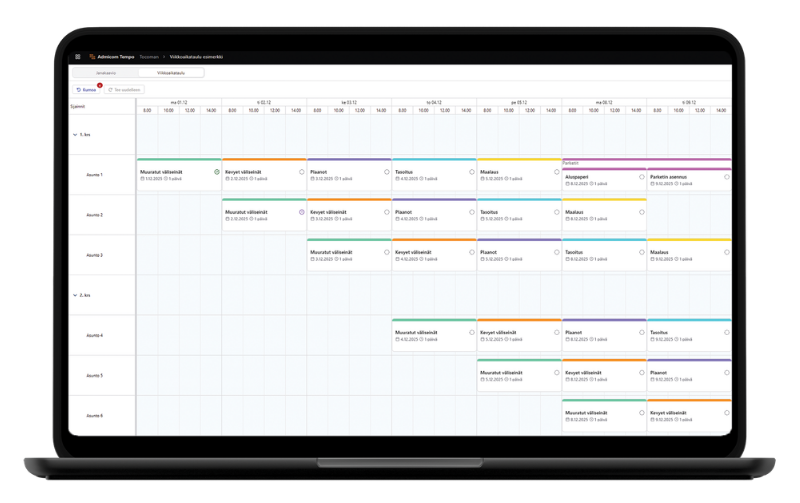
Tempo’s weekly schedule is a calendar view that enables day- and week-level planning on site within the same system as the master schedule. Tasks created in the master schedule can be dragged into the weekly calendar, broken down into smaller parts, and scheduled in more detail. Any changes can also be synced back to the Gantt chart if needed. At a glance, you can see the week’s tasks, ongoing work, and unscheduled items. With resource management, you also know who is doing what and when.
Sharing information with all stakeholders
You can use Tempo in collaboration with other project stakeholders—such as employees, subcontractors, and designers—to ensure everyone stays up to date on the project's progress and schedule. Different user levels allow each party access to the information they need. For example, you can grant a subcontractor’s site manager read-only access to the project free of charge. This way, the latest developments on site are taken into account, and you're not solely responsible for maintaining the entire project schedule.
Tempo also allows you to transfer data to other software solutions via file-based data transfer.
Construction site resourcing
The resourcing feature allows you to assign an employee, contractor, or machine/equipment to phases and weekly schedule tasks. It provides visibility into task hours and resource availability.
Easy to use on the construction site
In addition to computers, Tempo can also be used on tablets. Thanks to its browser-based nature, it can be accessed anytime and anywhere. Tempo features a clear and user-friendly interface, making it easy to use without requiring separate training for users. The software is available in multiple languages.
Multi-project view
Tempo allows you to view multiple projects simultaneously. Examining several projects together with resource allocation provides a clearer understanding of resource adequacy shared between projects.
Integrations
Integrations with Admicom's other software ensure that the schedule aligns seamlessly with the original plans, calculations, and actual execution.
Comprehensive schedule planning tools can be connected to Admicom Tempo, including time-location chart and takt planning. Through Admicom Planner integration, traditional schedules can be transferred to the cloud for real-time monitoring and information sharing.
The integration with Admicom Vision documentation software enables the linking of plans and quality documents to schedule tasks. This integration enables project schedulers to effortlessly access documents related to work phases.
Using an integration, work items from the Admicom Estima cost calculation software can be imported into Tempo to support schedule planning. By combining the calculation data with scheduled tasks, it becomes possible to plan task durations and timings based on pre-calculated quantities, which improves the accuracy of the project schedule.
Admicom Planner – Software for construction scheduling
Admicom Planner is Finland’s most popular construction site scheduling software, offering a wide range of tools for project planning, management, and monitoring. With Planner, you can create both traditional Gantt charts and takt schedules for more complex projects.
Planner can be used together with Tempo by transferring estimation data from Tempo to Planner, or by sharing a project created in Planner to Tempo for monitoring and information sharing. In particular, Tempo’s weekly schedule enables a more detailed master schedule created in Planner to be brought into Tempo as an execution-level schedule that can be actively followed and managed.
See if Admicom Tempo is the right construction scheduling software for your team
Frequently asked questions about Admicom Tempo
Looking for the right scheduling software for your construction projects? Here you’ll find answers to the most common questions about Admicom Tempo, including how it works, how to get started, and the benefits it brings.
What is Admicom Tempo and what is it used for?
Admicom Tempo is a cloud-based scheduling software designed for construction and building services engineering projects. It allows you to plan, track, and share project schedules so that all stakeholders always have access to the same up-to-date information.
In practice, Tempo brings together schedules, tasks, and resources into a single view. This helps site managers quickly understand project status and what needs to happen next, without relying on separate Excel files or printed schedules.
Tempo is not just a Gantt tool, but a shared scheduling software for the entire project organization, supporting planning, real-time tracking, and seamless information sharing.
Who is Admicom Tempo best suited for?
Admicom Tempo is designed for construction and building services engineering companies that manage multiple projects and need a clear and efficient way to handle project schedules.
Typical users include site managers, project managers, and business owners responsible for project execution, resource allocation, and staying on schedule. Tempo works well for both main contractors and subcontractors.
It is particularly well suited for small and medium-sized companies that need a more advanced solution than Excel, without the complexity and cost of heavy enterprise systems.
What problems does Admicom Tempo solve on construction sites?
Tempo addresses common challenges such as fragmented communication, outdated schedules, and difficulties in managing resources on-site.
Traditionally, schedules are created in Excel or printed and displayed on-site, making it difficult to keep everyone aligned when changes occur. This often leads to delays, idle time, and uncertainty about who is doing what and when.
With Tempo, schedules are updated in real time and shared instantly with all stakeholders. This helps teams react faster to changes, reduce inefficiencies, and keep projects moving forward as planned.
How does Admicom Tempo differ from Excel or traditional Gantt charts?
Tempo differs from Excel and traditional Gantt tools especially in terms of real-time collaboration, ease of use, and its focus on construction-specific needs.
In Excel, schedules are typically maintained by a single person and do not update automatically for others. Gantt charts are useful for planning, but they do not by themselves solve communication or day-to-day coordination challenges on-site. Neither is designed specifically for construction workflows.
Tempo is built specifically for construction projects. All stakeholders work from the same live schedule, which updates instantly as changes are made. In addition, Tempo integrates with other key construction solutions, allowing data to flow between tools without manual input or double work. This reduces errors, speeds up decision-making, and enables more proactive project management.
How does Admicom Tempo help keep projects on schedule and profitable?
Tempo helps keep projects on schedule by providing a continuous up-to-date view of progress, upcoming tasks, and resource allocation.
When everyone works from the same schedule, coordination between tasks improves and waiting times decreases. This reduces inefficiencies on-site and ensures resources are used more effectively.
Better schedule control also helps keep costs under control. Fewer delays and less rework lead to improved project profitability and more predictable outcomes.
Can Admicom Tempo be used together with other software?
Yes. Admicom Tempo is part of a broader Admicom software ecosystem and can be used alongside other solutions.
For example, scheduling data can be based on cost estimation data, and Tempo schedules can be connected to more detailed schedule planning or project documentation. This ensures that information flows smoothly between different stages of the project without manual data transfer.
Tempo is also a key part of the Admicom Site Operations solution, which combines scheduling (Tempo), documentation (Vision), and an AI assistant into one integrated workflow. This AI-supported approach helps especially site managers by reducing manual work and simplifying daily operations.
How quickly can Admicom Tempo be implemented in practice?
Tempo is designed for fast and lightweight implementation, without the need for complex IT projects or extensive training.
Because it is browser-based, you can start using Tempo as soon as you receive access. Using Tempo does not require extensive prior experience with scheduling software, and its core functionality can be learned quickly.
In practice, this means you can start creating value from your very first projects.
Can Admicom Tempo be used on-site and on mobile devices?
Yes. Admicom Tempo works in a web browser on mobile devices, making schedules accessible both on-site and in the office. It is optimized for desktop and tablet use, making it practical for site management in the field.
Site managers can review schedules, update information, and track progress directly from the construction site without separate applications or installations.
This ensures that information stays up to date where the work actually happens, without the need for manual updates later.
When used together with the AI assistant in Admicom Site Operations, updates such as task progress, durations, adding new tasks, or retrieving information from Tempo can also be handled conveniently via mobile devices.
When is Admicom Tempo the right solution and when is a more advanced scheduling software needed?
Tempo is the right solution when you need a clear and easy-to-use scheduling tool for daily site operations and project tracking.
It is particularly suitable when the goal is to improve communication, manage multiple projects, and gain real-time visibility without implementing a complex system.
If more detailed planning methods are required, such as location-based scheduling or takt planning, Tempo can be complemented with a more advanced scheduling solution Admicom Planner.
Can you try Admicom Tempo before making a purchase and what does it cost?
Yes, you can explore Admicom Tempo before deciding, for example, through a demo.
Pricing is based on subscription tiers and the number of users, and the solution is designed to be accessible also for smaller companies. In addition, viewing access can be shared widely without additional cost, making it easier to distribute schedule information across the project stakeholders.
In practice, the initial investment is relatively low, and the software can quickly pay for itself by improving time efficiency and reducing delays on-site.
Learn more about construction scheduling with Admicom Tempo
Leave your contact details and our expert will show you how Admicom’s software solutions can support your everyday construction scheduling.
You can also start with a free 2-week trial to explore the features and benefits at your own pace.