Skip to content
Admicom Trackinno

Trackinno Asset Management 

Trackinno Asset Management is a modern asset management system that brings transparency and control to the management of your company’s equipments, vehicles, and shared assets. With Trackinno, you spend up to 80% less time on repetitive asset tracking and follow-up tasks.
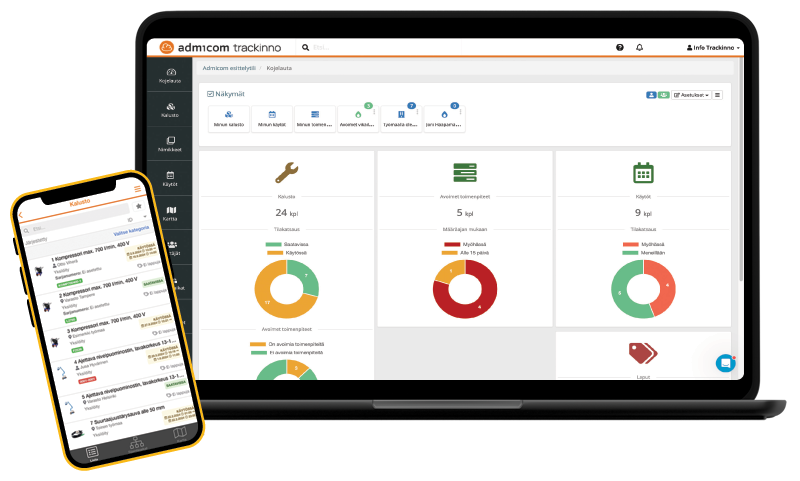
Desktop and mobile views of the Admicom Trackinno asset management dashboard showing asset availability, status reports, and customer site visit progress.

Do you recognize these asset management challenges?

Many companies struggle with the same issues. Assets are spread across multiple sites, availability and reservations are unclear, and supervisors spend valuable time calling around and chasing information.

 Ikoni - sijainti 1 Where was that vehicle again?

Supervisors spend time every day searching for assets and making phone calls. No one can say for sure where a specific vehicle, machine, or piece of equipment is right now.

The Trackinno solution:

barchart  Excel chaos

There are multiple versions of asset lists, and no one knows which one is up to date. Reservation information lives in a separate spreadsheet. Or sometimes only in a supervisor’s head.

The Trackinno solution:

Automatiikka  Double bookings and unpleasant surprises

The same machine is booked for two different sites at the same time. The issue only becomes apparent when the machine is supposed to be moved and one site is left without the equipment it needs.

The Trackinno solution:

orange

 Ikoni - sijainti 1 Where was that vehicle again?

Supervisors spend time every day searching for assets and making phone calls. No one can say for sure where a specific vehicle, machine, or piece of equipment is right now.

The Trackinno solution:

use list ok
You can see the real-time location of every asset directly on a map. When an operator checks an asset out for use or returns it, the location is automatically updated in the system. For vehicles and machines equipped with tracking devices, you get continuous GPS tracking without any manual data entry.
manual Link text
test
orange

barchart  Excel chaos

There are multiple versions of asset lists, and no one knows which one is up to date. Reservation information lives in a separate spreadsheet. Or sometimes only in a supervisor’s head.

The Trackinno solution:

use list ok
One cloud-based system, one source of truth. Always up to date on all devices. Asset registers, reservations, maintenance history, and documents are all managed in one place. When information is updated, it becomes instantly visible to everyone. Say goodbye to spreadsheets and email chains for good.
manual Link text
orange

Automatiikka  Double bookings and unpleasant surprises

The same machine is booked for two different sites at the same time. The issue only becomes apparent when the machine is supposed to be moved and one site is left without the equipment it needs.

The Trackinno solution:

use list ok
The calendar view instantly shows whether an asset is available at the desired time. The system automatically prevents overlapping bookings, so the same machine cannot be reserved for two sites at the same time. You can also see who made the reservation and for what purpose.
manual Link text

wrench  Maintenance gets forgotten

Inspections, scheduled maintenance, and mandatory checks are missed. A machine or vehicle is not available when it’s needed most.

The Trackinno solution:

euro-symbol  Assets sit idle while costs keep running

You don’t know how efficiently your assets are being used. You pay for rented equipment while your own machines are standing idle. Or, on the other hand, invest in new equipment even though existing assets are not fully utilized.

The Trackinno solution:

Mobiili  Inventory is a nightmare

Asset inventory takes days of work. Sites are checked one by one, supervisors are called, and in the end the result is still little more than an estimate.

The Trackinno solution:

orange

wrench  Maintenance gets forgotten

Inspections, scheduled maintenance, and mandatory checks are missed. A machine or vehicle is not available when it’s needed most.

The Trackinno solution:

use list ok
Create maintenance schedules for your assets that automatically generate maintenance tasks based on time, operating hours, or mileage. The system sends reminders to responsible persons ahead of due dates. All maintenance and inspection activities are stored in the asset history, ensuring documentation is always up to date and ready for audits and inspections.
manual Link text
orange

euro-symbol  Assets sit idle while costs keep running

You don’t know how efficiently your assets are being used. You pay for rented equipment while your own machines are standing idle. Or, on the other hand, invest in new equipment even though existing assets are not fully utilized.

The Trackinno solution:

use list ok
The dashboard visualizes asset utilization and clearly shows which machines are constantly booked and which are underused. You get a clear view of whether you have too much or too little equipment. Make investment and rental decisions based on data, not gut feeling.
manual Link text
orange

Mobiili  Inventory is a nightmare

Asset inventory takes days of work. Sites are checked one by one, supervisors are called, and in the end the result is still little more than an estimate.

The Trackinno solution:

use list ok
Inventory can be completed in minutes using QR codes or barcodes. Simply scan asset tags with a mobile device and mark assets as inventoried. The system immediately shows which assets are missing from the list. Inventory becomes fast and reliable thanks to real-time cloud data and technologies such as QR codes and tracking devices.
manual Link text

Who is Trackinno Asset Management for?

Construction sites, contractors, and infrastructure
  • You manage a significant amount of owned assets, including machinery, vehicles, lifts, and scaffolding
  • Assets move constantly between construction sites and infrastructure projects, requiring systematic asset management
  • You need clear visibility into where your assets are and whether they are in use or standing idle
Building services and installation companies (HVAC)
  • You manage specialized tools, installation equipment, and service vehicles
  • Assets are distributed across multiple sites and used by different installation teams
  • You need confidence that the right tools are at the right site at the right time
Property maintenance and facility services
  • You maintain properties and the related technical equipment
  • You need visibility and tracking for service vehicles, machines, and equipment


Benefits of Admicom Trackinno asset management

  • Easy implementation

    Our experts help you to get started with the software.

  • Import from Excel

    Asset information can be imported to Trackinno with an Excel file.

  • Comprehensive filters

    Comprehensive filtersMake specific searches and save them as shortcuts.

  • User roles

    Limit content and features based on user roles.

  • Visualized statistics

    Use visualized statistics to support decision making.

  • Easily integrated

    Trackinno also integrates to other systems.

  • Configurable

    Trackinno is configured to fit your company’s needs.

  • Works offline

    Trackinno works also where there’s no Internet available.

How much time and money does Trackinno Asset Management save?

Time savings (based on customer feedback):

📞 80% less time spent calling around and searching for assets
📋 90% faster inventory (from days to hours)
📊 70% faster reporting

Cost savings: 

💰 15–25% higher asset utilization → fewer unnecessary rentals and investments
🔧 Maintenance completed on time → fewer unexpected breakdowns and downtime
❌ No double bookings → fewer site delays and last-minute rescheduling

Example calculation:

A company with 50 machines and 100 employees:

  • Supervisors save 2 hours per week per person searching for assets
    → 8–10 hours per week in total
  • With an hourly cost of €40
    → savings of approximately €20,000 per year in time alone
  • Trackinno cost: approx. €400–600 per month
  • ROI: less than 3–4 months
Book a demo
Powerful tools for asset management

Explore the features in more detail

Trackinno Asset Management offers a comprehensive set of tools for asset management. The system has been developed in close collaboration with our customers, incorporating best practices from asset management across multiple industries. This makes Trackinno Asset Management an excellent solution for managing company assets, regardless of industry.

Asset register

  • All asset information is in one place and always accessible
  • Reviewing and updating information is easy even with mobile devices
  • Dynamic data structure and outlook
  • Comprehensive search functions

With Trackinno’s asset register, your company’s assets and other goods information is held in one place and always available to you. An up to date asset register is the basis of functional asset management.

Trackinno offers versatile tools for asset management configuration. The asset register is tailored to suit your business needs! You can define what asset information is shown in the list view, and create default and locked views for different user roles.

You can build the asset register in a hierarchical fashion to be able to utilise the categories and device models or titles you have defined. Additionally, you can create information fields in the system dynamically. For example, you can define a data field that is only shown for devices of a specific model or category.

Asset planning

  • Easy scheduling of asset bookings and maintenance
  • Recognition of investment needs
  • Assets available when needed


With Trackinno, planning your asset booking and maintenance schedule is easy and in one place. From the equipment’s schedule view you can see in one look if the equipment is available on specific dates and who has booked the asset.

From the asset schedule view you can also see how much the asset is in use. Based on the asset usage level you can recognise if your business has investment needs related to the asset, or if it has assets it does not need.

Trackinno keeps asset bookings and maintenance schedules up to date. The system prevents double bookings and other situations where equipment is not available when it is needed.

Asset borrowing and returning

  • Up to date information about where the asset is and who is using it
  • It is easy to log entries related to the asset by using the tags attached to each asset

From the entries made at equipment borrowing and return, you can see where the asset is and who is using it. Each asset’s bookings and usage history are saved securely on the device’s card.

Logging entries related to the asset’s bookings, borrowing and return is easy in Trackinno. It is easiest to do using a smartphone. You just need to read the tag attached to each asset (such as a QR code, bar code or NFC tag) and tap on the “Check in” or “Check out” button! If required, a signature can also be requested with each entry.

Electronic forms

  • Free yourself from paper forms and other scattered data collection
  • The opportunity to create an endless number of different forms
  • You can limit the forms and form fields according to user type

With electronic forms, you can fill in different types of inspection forms easily on your mobile device. Electronic forms stay safe in one place and are easily accessible even over long periods of time. You can get rid of paper forms and other scattered data collection methods whose filing is time consuming and that make information use difficult.

In Trackinno you can create a limitless amount of different forms. You can define compulsory fields for the forms, and choose to show or hide fields depending on user role or the answers given. You can also add instructions to the forms, to help users fill in the forms correctly. It is easy to make different versions of the same form for different device types or names.

From the data collected by the forms, you can create statistics for reporting for each device (e.g. the number of hours in use or the kilometres driven). Reporting work outwards is easier, since the reports can be printed in PDF format and sent from the system directly into specified email addresses.

You can create public forms in Trackinno. This way a user who is not signed in can fill in e.g. an issue report by reading the QR code of the device on their smartphone.

Proactive maintenance

  • The opportunity to create an endless number of maintenance programs and repeated tasks
  • The asset’s maintenance history is reported reliably

Tasks related to proactive maintenance could be periodic inspections, yearly maintenance and calibration. You can create maintenance programs for these and repeated tasks based on things like time, mileage or usage hours. These tasks will be added to the devices automatically, so that important maintenance events do not get accidentally forgotten.

All maintenance events for individual devices will be stored on the device card’s timeline. On the timeline it is easy to see what maintenance the device has received throughout its lifetime. Systematic asset maintenance keeps the equipment useable for a longer period of time. It also reduces the risk of sudden issues and situations, where the equipment is not useable when it is needed.

Do you provide maintenance services to your customers?
Explore Trackinno Maintenance, designed specifically for companies offering maintenance and field service.

Fault reporting

  • Submit fault report easily on your mobile device
  • Take care of reporting and adding entries on location
  • Filter reports by team, location or status
  • Check the fault reports in the calendar view and notice works without resources easily


With the fault reports, you can get sudden issues under control and can be assured that the reports are handled and fixes are done. Submitting a fault report is easy on both the mobile app and the browser. New issue reports can be sent to the person responsible via email or push notifications. Fault reports will appear in the device card and actions list.

You can create public forms in Trackinno. With public forms, a user who is not logged in can also send an issue report by reading the QR code on the equipment with their smartphone.

Maintenance for customers can be batched as work orders in Trackinno. With work orders a report can be printed of the maintenance work done and any billable items such as the hours spent and any supply parts. With the work orders you can guarantee that all jobs are also billed.

Learn more about Trackinno Maintenance here.

Inventory management

  • Find out easily what assets are in what storage space
  • Efficient and reliable inventory
  • Alarms based on storage quotas
Trackinno makes storage management easy, efficient and reliable. The system allows you to manage assets, spare parts and consumables. Information about what equipment your company has and where it is located is kept up to date and always accessible.

In Trackinno you can find with one click what asset is in what storage space or location. You can create an endless amount of storage spaces and locations in the system and define them however best makes sense for your organisation.

Trackinno’s storage maintenance allows you to define limits for your storage balance by item. This way you get an alert when the balance falls below the limit. All events related to storage and balance changes are saved on the timeline of each item. The system offers a summary of quantities and the value of the storage, and you can also export the data to Excel.

Asset orders

  • Transfers between storage spaces to the site and back
  • Order spare parts from vendors based on the shortage list available in Trackinno
  • Collect and receive orders on your mobile device
  • Monitor the situation and notifications of order status change

Trackinno lets you receive and create different types of asset orders. For example, you can make internal orders between storage spaces or from the storage spaces to the site and back.

Collection and deficiency reporting are also easy to do on your mobile device. In Trackinno you can make return requests on the field and inventory before storage. You can stay up to date on orders with the status reports.

You can use the order feature also to order spare parts directly from the supplier. You can make an order based on a shortage list available in Trackinno. A list of the products to be ordered will be sent from the Trackinno system directly to the supplier by email. When the delivery is marked as received, the storage balance will be automatically filled in the system.

Mobile applications

  • Available to download from app stores for Android and iOS devices
  • All asset information travels easily in your pocket
  • Receive push notifications about system events
  • Work even in offline mode

Trackinno Mobile is a very easy to use app with features that can be specified precisely to suit your business. Our principle is that the end user is shown all they need to see, but nothing they don’t. This way the application use is kept simple. Features can be turned on or off also depending on user role.

With the Trackinno app you can find all asset information in your own pocket. By scanning the code on the device, you can easily find e.g. the device’s calibration certificates, maintenance instructions, reservation status and usage history.

With the mobile app it is easy to confirm receipt of items related to the device on the field and fill in the electronic form about scheduled maintenance. You can also receive push notifications about system events, and working is easy also in the offline mode.

Vehicle tracking

  • Track vehicle mileage and operating hours in real time
  • Automatically meets statutory vehicle logbook requirements
  • Driver selection is quick and easy using a QR code
  • Synchronize mileage data with Ultima without manual work

Vehicle tracking provides clear visibility into the movement and usage of your company’s vehicle fleet. The system automatically generates legally compliant vehicle logbooks and consolidates vehicle mileage, operating hours, and driver information. QR code–based driver selection ensures that all data is always accurately linked to the correct vehicle and user.

Multiple tracking devices are available to suit different installation needs, including OBD plug-in devices, battery-connected solutions, and fully hardwired tracking units. You can choose the option that best fits your fleet.

Mileage and operating hour data collected through vehicle tracking can also be used as part of maintenance schedules. This allows maintenance tasks to be scheduled precisely based on actual usage, supporting proactive and preventive maintenance of your fleet.

Tags and identifiers

  • Tilaa tunnisteet Trackinnolta tai käytä olemassa olevia viivakoodeja
  • You can use the Trackinno Mobile app to read the identifiers, or you can use readers like Nautiz
  • Using a GPS locator you can receive automatic data about the asset’s movements

In Trackinno the asset can be marked with a QR code, bar code or NFC code. Different tags and identifiers can function as links between the physical asset piece and the digital device card in the system.

You can read the asset’s tag with the Trackinno mobile app. By scanning the code with a smartphone, you can access the device’s data directly and the device’s map location is updated in the system automatically. The Trackinno Mobile app also works with the Nautiz reader, which can be used as a centralised reader in more challenging circumstances.

We always map the best tag and identifier options depending on the customer’s usage situation and the environment.

Integrations

The Admicom Ultima–Trackinno integration brings vehicle tracking and invoicing together into one unified workflow. The integration reduces manual work and speeds up the invoicing process by automatically transferring work and driving data from Trackinno to Ultima.

Completed tasks and mileage data are available in Ultima immediately after the work is finished. The workflow runs seamlessly when the same real-time data is accessible to supervisors, technicians, and invoicing alike.

trackinno-asset-list-mobile-600

Trackinno Mobile: a user-friendly app for asset management


All asset information in your pocket

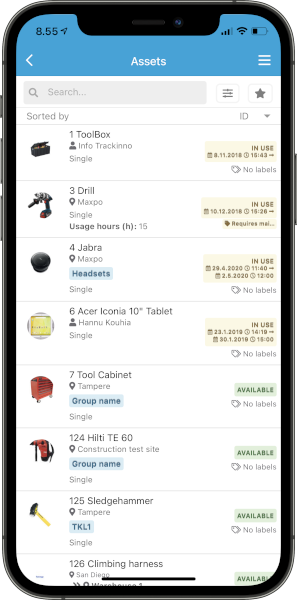
By scanning a tag attached to an asset with Trackinno Mobile app, you can easily check that asset’s information such as calibration certifications, maintenance instructions and other attachments, as well as reservation status and usage history.


Adapts to your company’s operations

Trackinno Mobile is a user-friendly app and its settings are carefully tailored to fit your company’s needs. We can also show and hide features based on user roles.


Available for both Android and iOS

Trackinno Mobile app is available for both Android and iOS devices.

Our customers

fastems-logo
fimlab-140x140-150x150
lehtovuori-140x140-150x150
delete-logo-140x140-150x150
fira-logo-140x140-150x150
sumitomo-shi-fw-logo-140x140-150x150
Trackinno Asset Management

Price

Trackinno Asset Management has no user limits or base license fees. Pricing is based on the rental of tracking devices and tags. Asset Management does not include the work management features of Trackinno Maintenance.

yellow
Device rental
min. 99€ / kk

For example: 8 vehicle trackers, 1 gateway for warehouse coverage, and 50 active tags for shared equipment — €185 per month.

use list ok
Asset register
Asset usage (check-out / return)
Booking and scheduling
Asset locations (QR / NFC / GPS)
Mobile app
Dashboard and reporting
use link ok manual Link text
Get a quote!
Trackinno-laitteet-neliö

Do you also provide maintenance services for your customers? 

Many construction companies, especially HVAC contractors, deliver maintenance and servicing at customer sites. Trackinno Maintenance is our solution for this need.

With Trackinno Maintenance, you can:

  • Manage customer site maintenance in a planned and systematic way
  • Control maintenance schedules and fault reports
  • Use public QR codes to allow customers to submit fault reports easily
  • Provide supervisors with a real-time overview of maintenance operations

READ MORE
Contact us

Ask for more information or book a demo meeting using the contact form.